Mastering the Tulip Bouquet One Line Art Design for Professional Results
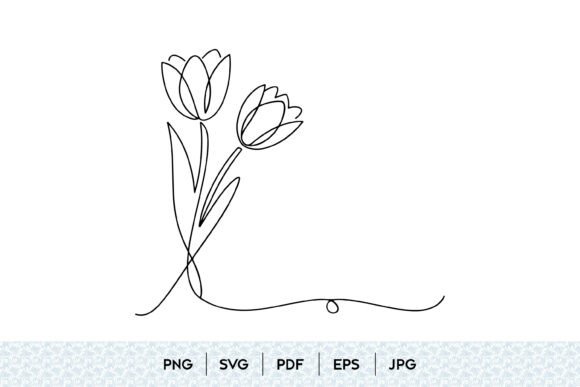
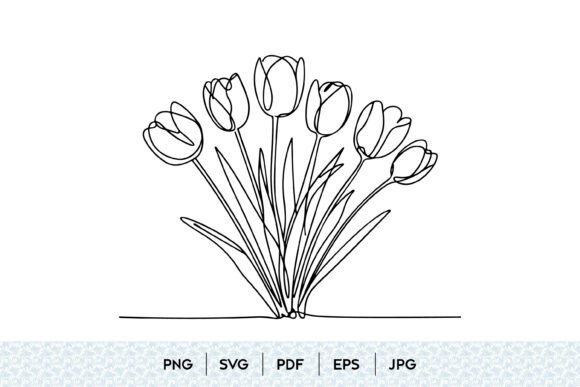
The allure of minimalism has transformed how we approach digital and print design, with the Tulip Bouquet One Line Art Design emerging as a standout favorite. This style, characterized by a continuous, unbroken stroke that forms the shape of tulips, offers a sophisticated blend of modern aesthetics and natural beauty. However, acquiring or creating these assets is not as straightforward as it appears. Many creators, from freelance graphic designers to small business owners selling wedding invitations, often stumble over technical nuances that compromise the final output. Understanding the intricacies of file formats, scalability, and application is crucial to leveraging this botanical sketch effectively.
The Trap of Low-Resolution Downloads
One of the most common pitfalls when sourcing floral line art is ignoring resolution specifications. You might find a stunning tulip illustration online, download it, and place it into your project, only to discover it looks pixelated when printed. This happens because many free resources provide low-quality JPGs intended for screen viewing, not professional production.
When you receive a zip file containing a Tulip Bouquet One Line Art Design, pay immediate attention to the included formats. A high-quality package should offer PNG at 300 ppi, along with vector formats like EPS and SVG. The PNG ensures crisp edges for raster-based workflows, while the vector files allow infinite scalability without quality loss. If you rely solely on a standard JPG, you limit your ability to resize the flower bouquet for large-format prints like banners or wall art. Always verify that the source provides vector options to maintain the integrity of the continuous line drawing regardless of dimensions.
Misunderstanding Vector vs. Raster Workflows
Another frequent error involves using the wrong file type for the wrong medium. While PNGs are excellent for web use and transparent backgrounds, they are not editable in the same way vectors are. Beginners often attempt to edit a botanical design in Photoshop when they should be using Illustrator or Inkscape. By sticking to raster images, you lose the ability to adjust stroke weight, change colors easily, or modify the curve of the tulip flowers.
To avoid this, utilize the SVG or EPS files included in your download. These formats treat the outline drawing as mathematical paths rather than pixels. This distinction is vital for tasks such as vinyl cutting, laser engraving, or creating custom flower tattoos. For instance, if you are designing a wedding bouquet invitation suite, using an SVG allows you to seamlessly integrate the elegant floral lines with typography, ensuring the line weights match perfectly. Ignoring vector capabilities restricts your creative flexibility and can lead to inconsistent branding across different materials.
Overlooking Contextual Harmony
A minimalist flower design thrives on negative space, yet many users clutter the composition. When incorporating a tulip bouquet into a larger layout, there is a tendency to add excessive decorative elements that compete with the simplicity of the line drawing flower. This overcrowding diminishes the impact of the contemporary art style, making the design feel busy rather than refined.
The better approach is to let the botanical artwork breathe. Use the black and white contrast to your advantage. If you are creating a Mothers Day gift card, pair the romantic flowers with ample white space and simple, sans-serif typography. This highlights the natural beauty of the blossom and maintains the elegant design ethos. Remember, the strength of one-line art lies in its suggestion of form rather than explicit detail. Trust the viewer’s eye to complete the image, and avoid the urge to over-decorate.
Neglecting Licensing and Usage Rights
Perhaps the most critical oversight occurs before the design process even begins: failing to check licensing terms. Not all floral clipart is created equal. Some downloads are for personal use only, while others permit commercial applications. Using a printable design for client work or product sales without proper clearance can lead to legal issues and financial penalties.
Before integrating a garden flower motif into your brand identity or merchandise, review the license agreement. Look for clear permissions regarding commercial use, modification rights, and attribution requirements. A reputable provider will include this information in the zip file or on the download page. Ensuring you have the right to use the decorative flower commercially protects your business and respects the artist’s effort. It is a small step that prevents significant headaches down the line.
Choosing the Right Format for Specific Applications
Different projects demand different file types. Here is a practical guide to selecting the appropriate format from your Tulip Bouquet One Line Art Design package:
- Web and Social Media: Use the PNG file. Its transparency support allows the floral element to sit cleanly over colored backgrounds without unsightly white boxes.
- Large Format Printing: Opt for EPS or PDF. These vector formats ensure that the spring flowers remain sharp whether printed on a business card or a billboard.
- Cutting Machines: SVG is ideal for Cricut or Silhouette users. It translates the hand drawn lines into cut paths accurately, perfect for creating floral decor stickers or stencils.
- Quick Previews: JPG files are suitable for mood boards or internal reviews where file size matters more than transparency or scalability.
Final Checks Before Implementation
Before finalizing your project, perform a few quality checks. Zoom in on the monochrome lines to ensure there are no jagged edges or broken paths, especially if you modified the vector. Verify that the botanical sketch aligns with your brand’s tone—does the modern floral style complement your existing visuals? Additionally, test the design in grayscale if it will be printed in black and white to ensure contrast remains sufficient.
By paying attention to these details, you transform a simple clipart download into a powerful design asset. The Tulip Bouquet One Line Art Design offers versatility and elegance, but only if handled with technical precision and artistic restraint. Avoid the common mistakes of poor resolution, wrong file usage, and contextual clutter. Instead, embrace the scalability of vectors, respect licensing terms, and prioritize clean composition. This mindful approach ensures your flower outline enhances your communication, elevates your brand, and delivers the sophisticated aesthetic your audience expects.